Best practices for using PayEazy and checkout tools without confusion
PayEazy bundles the dining deal and payment into one clear checkout screen
22 Oct, 2026 by Editorial Team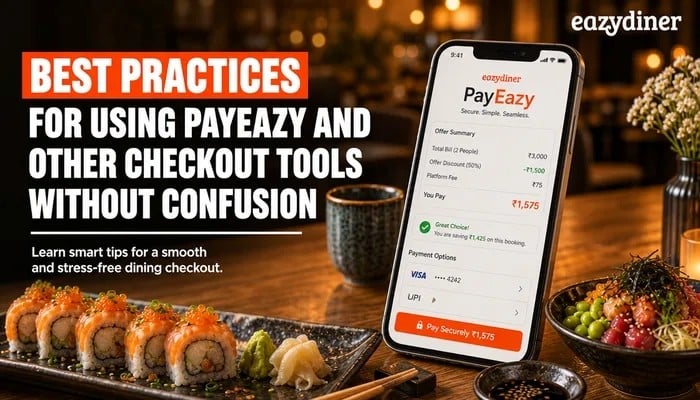
You found the restaurant, picked the offer and chose a time slot. Then the checkout screen appeared, and you paused. Was the discount already applied? Would PayEazy charge your card now or later? That moment of hesitation costs diners real savings and restaurants real bookings. EazyDiner built PayEazy and its prepaid offer flows to make dining payments simple, yet a few best practices on the diner's side can remove confusion entirely.
TL;DR - Summary
- What is PayEazy on EazyDiner?
PayEazy is EazyDiner's integrated checkout option that lets diners pay for restaurant bookings and prepaid dining deals directly inside the app. PayEazy can help reduce the back-and-forth of settling bills at the table by handling payment before or during the booking flow.
- Why does checkout confusion happen?
Diners often understand the restaurant and the offer but hesitate because prepaid terms, discount application and payment steps are not reviewed before tapping "pay." Scanning the offer summary screen for a few seconds can prevent most drop-offs.
- How do prepaid dining deals connect to booking?
A prepaid deal on EazyDiner locks in a discount when the diner pays in advance through the app. The booking confirmation and the payment receipt arrive together, so the restaurant already knows the deal is settled before the diner walks in.
- What is the single best habit for confident checkout?
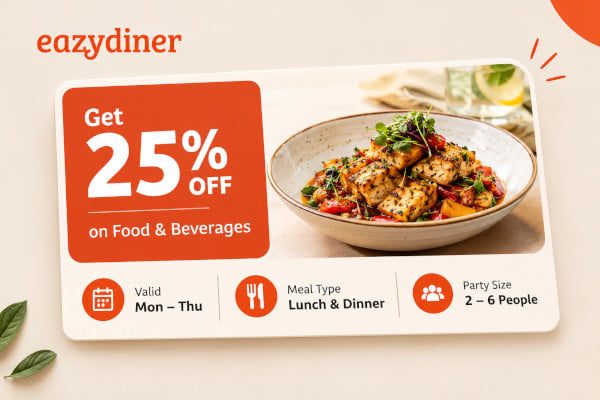
Read the offer card details (discount percentage, valid days, meal type, party size conditions) before entering the payment screen. Confirming these details first means no surprises at checkout or at the restaurant.
What is PayEazy?
PayEazy is EazyDiner's built-in payment feature. PayEazy lets diners complete restaurant payments inside the EazyDiner app itself, whether for a prepaid dining deal or a booking-linked offer. Instead of asking for a separate bill at the table, the diner settles the amount during the booking flow.
Because PayEazy sits inside EazyDiner's interface, the discount or offer is visible on the same screen as the payment step. That proximity is designed to reduce the guesswork diners face when they wonder whether a promotion has been applied correctly.
Why diners hesitate at checkout
Checkout hesitation rarely comes from distrust. It comes from ambiguity. A diner might see a "50% off" tag on a restaurant listing but not know whether that discount appears automatically at payment or requires a code. Another diner might wonder if the prepaid amount covers taxes or only the food total.
These small unknowns stack up. When the payment screen loads and the numbers do not match expectations, the natural response is to abandon the transaction. That abandoned transaction means the diner misses the deal and the restaurant loses a confirmed guest.
Understanding how EazyDiner structures its offer and payment screens can help diners move through checkout with confidence instead of confusion
Best practices for a smooth checkout
1. Read the offer card before entering payment
Every prepaid deal and restaurant offer on EazyDiner has an offer card. The offer card states the discount percentage, the valid days (weekdays, weekends or both), the meal type (lunch, dinner or all day) and any party size conditions. Reading the offer card takes a few seconds and answers most questions diners have at checkout.
2. Confirm the booking details first
Before tapping the payment button, verify the date, time slot, party size and restaurant name on the booking summary. A mismatch between the booking details and the offer terms (for example, selecting a weekday offer for a Saturday dinner) can trigger confusion when the discount does not appear as expected.
3. Check the payment breakdown screen
EazyDiner's checkout flow shows a breakdown of the amount. Look for the original price, the discount line and the final payable amount. If the numbers align with the offer card, proceed. If something looks off, go back to the offer card and compare the terms. This single step can help prevent most payment-related complaints.
4. Understand prepaid versus pay at restaurant
Some EazyDiner offers are prepaid, meaning the diner pays through the app before visiting the restaurant. Other offers apply a discount that the diner settles at the restaurant. The offer card specifies which type applies. Knowing the difference before checkout removes the surprise of an immediate charge or the confusion of expecting a zero balance at the table.
5. Save the confirmation receipt
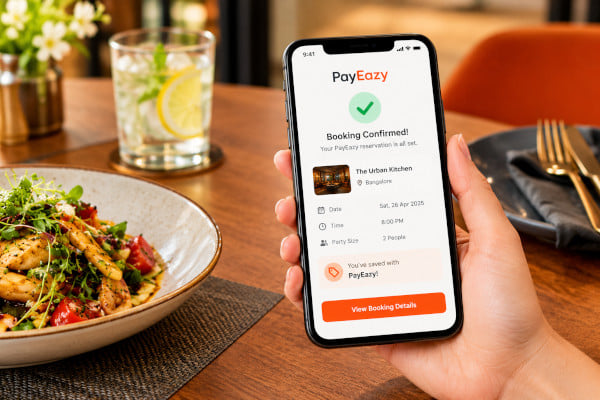
After completing a PayEazy transaction, EazyDiner sends a booking confirmation that doubles as a payment receipt. Keep this confirmation accessible on your phone. Showing the confirmation at the restaurant ensures the host recognises the prepaid deal without delay, especially during busy dinner hours when staff handle multiple walk-ins and reservations.
6. Review cancellation and refund terms
Prepaid deals on EazyDiner carry specific cancellation terms stated on the offer card. Before paying, note whether the deal is refundable, partially refundable or non-refundable. Knowing the cancellation policy upfront means no unpleasant discoveries if plans change after payment.
7. Use one payment method per transaction
Splitting a single prepaid deal across multiple payment methods can create reconciliation confusion. Where possible, complete the PayEazy transaction with one card or one UPI method. A single payment method keeps the receipt clean and makes any future refund straightforward.
How prepaid deals connect to bookings
On EazyDiner, a prepaid dining deal and a table booking are not separate actions. When a diner selects a prepaid offer, the app bundles the payment and the reservation into one flow. The diner picks the restaurant, selects the offer, chooses a date and time, confirms party size and then pays through PayEazy.
Once payment is complete, the restaurant receives a confirmed booking with the prepaid deal already attached. The diner does not need to mention a coupon code or show a separate voucher. The confirmation itself carries all the information the restaurant needs.
This bundled approach is designed to help both sides. The diner arrives knowing the deal is settled. The restaurant knows the guest is committed, which can help reduce no shows during peak hours like Friday and Saturday dinners
When to use PayEazy
PayEazy is most useful when EazyDiner lists a prepaid offer with a meaningful discount, such as a percentage off the total bill for a specific restaurant. Diners who plan meals in advance (birthday dinners, anniversary celebrations, group outings) can benefit from locking in the deal and the table in one step.
For spontaneous meals where the diner prefers to pay at the restaurant, EazyDiner also lists pay-at-restaurant offers. In those cases, PayEazy is not required, and the diner simply books the table and settles the bill on site. Choosing the right offer type before entering checkout prevents the confusion of expecting one flow and encountering another.
Building long-term confidence
Payment confidence is not built in a single transaction. It grows when diners develop a habit of reading offer terms, checking the payment breakdown and saving confirmations. Over time, these small steps become automatic, and checkout on EazyDiner feels as routine as selecting a restaurant
EazyDiner's PayEazy feature is designed to make dining payments straightforward. When diners pair that design with a few deliberate habits, the result is a checkout experience where hesitation has no reason to appear.