
Best Practices for Using Prepaid Dining Deals Without Surprises
Reading the terms before paying keeps your restaurant experience smooth
29 Oct, 2026 by Editorial Team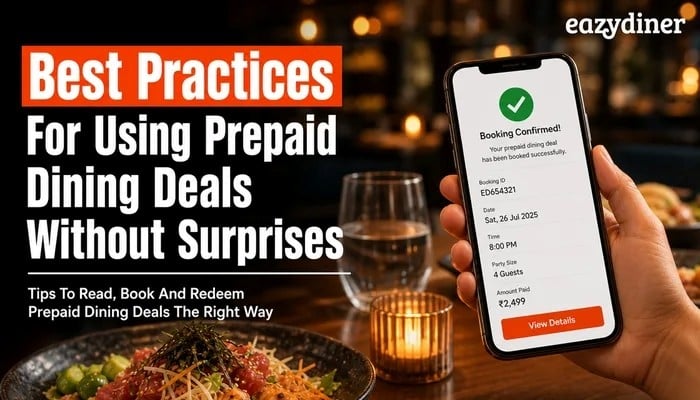
Prepaid dining deals on EazyDiner let you lock in savings before you reach the restaurant, but only when you know what to check first. EazyDiner lists prepaid deals across Delhi NCR, Mumbai, Bangalore and other metro cities, and a few minutes of preparation can separate a smooth meal from an awkward conversation with the host.
TL;DR - Summary
- What are prepaid dining deals?
Prepaid dining deals are offers where you pay a fixed amount through a restaurant booking app before your visit, securing a confirmed discount or set menu price. EazyDiner surfaces these deals alongside table reservations so you can compare terms before committing.
- Why read the terms first?
Each prepaid deal carries its own rules on valid days, meal periods, party size and menu scope. Skipping the fine print is the single biggest reason diners feel surprised at the table.
- How do you redeem smoothly?
Show your confirmation screen to the restaurant host on arrival, confirm the deal applies to your party size and order within the included menu. Checking these three points takes under a minute and prevents most friction.
- Can you cancel or modify?
Cancellation and modification policies vary by deal. Always review the refund window and any non-refundable conditions on the deal page before you pay.
- Which cities have prepaid deals?
EazyDiner lists prepaid deals in Delhi NCR, Mumbai, Bangalore, Chennai, Hyderabad, Kolkata and other major Indian cities. Availability changes by restaurant and season.
What are prepaid dining deals?
Prepaid dining deals are arrangements where you pay a set amount through a booking platform before arriving at the restaurant. The payment confirms your reservation and locks in a specific saving, a set menu price, or a bundled experience. EazyDiner shows these deals on the restaurant's listing page, alongside the regular booking option, so you can compare both paths.
Unlike walk-in discounts that depend on the restaurant's mood or occupancy, a prepaid deal is a binding transaction. The restaurant has already agreed to honour the terms once your payment clears. That clarity benefits both sides: the restaurant fills a seat with a guaranteed cover, and you know exactly what you will spend before you leave home.
Why do surprises happen with prepaid deals?
Most friction comes from three gaps: diners skip the terms, restaurants update menus without syncing the deal, or the party size changes after purchase. Understanding these gaps helps you avoid each one.
Unread terms and conditions
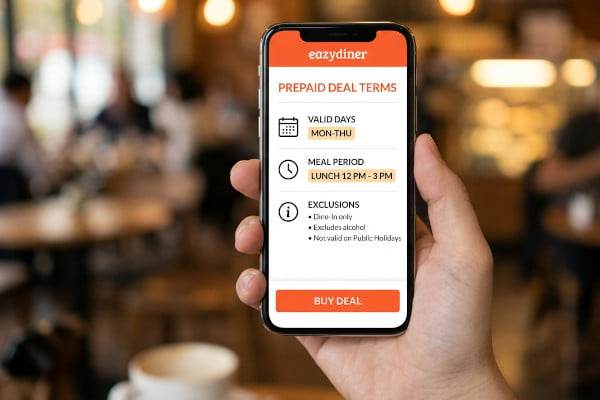
Every prepaid deal on EazyDiner has a terms section below the price. The section lists valid days, meal periods (lunch or dinner), included courses and any exclusions such as beverages or taxes. Diners who tap "pay" without scrolling down often discover a mismatch only at the table.
Menu or timing changes
Restaurants occasionally rotate seasonal menus or shift meal timings. A deal created around a winter menu may not cover a spring replacement dish. Checking the deal's "valid until" date and the restaurant's current menu on EazyDiner reduces this risk.
Party size mismatches
Some deals are priced per person, others per couple, and a few cover a fixed table of four. Adding a guest after purchase can mean paying full price for the extra cover, or worse, the restaurant refusing to seat the larger group under the deal.
What are the best practices for using prepaid deals?
The following numbered practices give you a reliable checklist. Work through them in order before every prepaid purchase on EazyDiner.
1. Read the full deal description and terms
Open the deal page and scroll past the headline price. Look for the valid days, meal period, included courses, excluded items (often beverages and taxes) and the maximum party size. If any term is unclear, check the restaurant's EazyDiner listing for contact details and confirm directly.
2. Match the deal to your actual dining plan
Confirm that your visit date, time and guest count fall within the deal's conditions. A weekday lunch deal will not help you on a Saturday dinner. Write down the specifics so you do not rely on memory when the date arrives.
3. Check the restaurant's current menu
Cross-reference the dishes named in the deal with the restaurant's live menu on EazyDiner. If the deal promises a set menu, verify that the courses listed are still available. Seasonal rotations can quietly change what is on the plate.
4. Understand the cancellation and refund policy
Before paying, note the refund window. Some deals allow free cancellation up to 24 hours before the reservation; others are non-refundable once purchased. EazyDiner displays the policy on the deal page. Screenshot the policy for your records.
5. Save your confirmation and share it
After payment, save the confirmation screen or email. Share the confirmation with everyone in your party so at least two people can show it at the restaurant. A dead phone battery should not derail your evening.
6. Arrive on time and mention the deal at the host stand
Present your confirmation to the host as soon as you arrive. Mentioning the prepaid deal after you have already ordered from the regular menu can create billing confusion. Early disclosure lets the kitchen prepare the correct courses.
7. Confirm the bill before you pay any extra
When the bill arrives, check that the prepaid amount has been deducted and that only legitimate extras (additional drinks, dishes outside the deal, applicable taxes) remain. If something looks wrong, raise the issue with the manager while you are still seated.
How do you redeem a prepaid deal at the restaurant?
Redemption on EazyDiner follows a simple sequence. Search for the restaurant, select the prepaid deal, pay through the app, and receive a confirmation with a booking reference. At the restaurant, show the confirmation to the host. The host matches the reference against the restaurant's reservation list and seats you under the deal's terms.
Some restaurants use a tablet or POS integration that automatically applies the prepaid credit to your bill. Others handle the adjustment manually. Either way, your job is the same: present the confirmation early and verify the final bill before you leave.
How should you handle changes after purchase?
Plans shift. A guest drops out, your meeting runs late, or you simply change your mind about the date. Here is how to handle each scenario without losing your prepaid amount.
If you need to change the date or time, open the booking on EazyDiner and check whether modification is allowed. Many deals permit a one-time reschedule within the validity window at no extra cost. If the deal does not allow changes, contact EazyDiner support before the cancellation deadline.
If your party size shrinks, the deal may still apply, but you will not receive a partial refund for unused covers unless the terms say otherwise. If your party size grows, book the extra covers separately or call the restaurant to ask whether the deal can be extended at the same per-person rate.
If you need to cancel outright, act before the refund window closes. Non-refundable deals are clearly marked on EazyDiner. Waiting until the last hour almost always forfeits the payment.
Which details matter most on the deal page?
| Detail | Why it Matters | Where to find it on EazyDiner |
| Valid days | Weekday deals do not cover weekends | Terms section below the price |
| Meal period | Lunch and dinner menus often differ | Terms section or deal title |
| Included courses | Confirms what you actually receive | Deal description |
| Excluded items | Beverages, taxes and extras add to the bill | Terms section |
| Party size | Prevents seating or billing conflicts | Terms section |
| Cancellation policy | Protects your payment if plans change | Below the terms or in the booking flow |
| Validity period | Expired deals cannot be redeemed | Deal description or banner |
Scanning this table before every purchase takes less than a minute and covers the seven most common sources of surprise.
Prepaid dining deals on EazyDiner can be a straightforward way to save on meals across Delhi NCR, Mumbai, Bangalore and beyond, provided you treat the deal page as a short contract rather than a quick checkout. Read the terms, match them to your plans, save your confirmation, and speak up at the host stand. Those four habits turn prepaid deals from a gamble into a reliable part of how you dine out.