A Checklist for Spotting Misleading Restaurant Offers on Apps
Evaluate restaurant offer terms before booking to avoid billing surprises
23 Oct, 2026 by Editorial Team
Restaurant offers on apps can look irresistible. A flat 50% off, a complimentary dessert, a buy one get one deal. But once you reach the restaurant or finish your meal, the final bill tells a different story. Hidden conditions, narrow validity windows and unclear terms turn what seemed like a great deal into a frustrating experience. EazyDiner built this checklist so Indian diners can evaluate any restaurant offer before tapping "book" and avoid the most common traps.
TL;DR - Summary
- Why do restaurant offers mislead?
Many dining deals on apps attach conditions that are hard to spot before checkout. These include minimum spend requirements, limited menu applicability, blackout dates and unclear billing terms. Knowing what to look for can help diners avoid unpleasant surprises.
- What should you check first?
Start with the offer's validity window, the menu items the offer actually covers, and whether the discount applies before or after taxes and service charges. These three details account for most billing disputes.
- How does EazyDiner approach offer transparency?
EazyDiner is designed to show offer terms upfront during the booking process, including what the discount covers and any conditions attached. Diners using EazyDiner can review deal details before confirming a reservation.
- Is a checklist really necessary?
Yes. Indian diners frequently encounter offers that look generous but deliver far less value than expected. A simple pre-booking checklist can help you compare deals across apps and make safer dining decisions.
Why offers can mislead
A restaurant offer is only as good as its terms. The headline number, whether 40% off or a flat ₹500 discount, rarely tells the full story. The real value depends on what the discount applies to, when the offer is valid and what you must spend to unlock the discount.
Many dining deals in India attach conditions that shrink the effective savings. A "50% off" offer might apply only to the food bill, excluding drinks, taxes and service charges. The final discount on your total bill could be closer to 20% or 25%. Without reading the fine print, diners walk in expecting one price and walk out paying another.
 This gap between expectation and reality is not always intentional. Some restaurants structure offers to manage costs. But when the terms are buried or unclear, the result is the same: the diner feels misled. EazyDiner addresses this by surfacing offer conditions during the booking flow, so diners can evaluate the deal before committing.
The pre-booking checklist
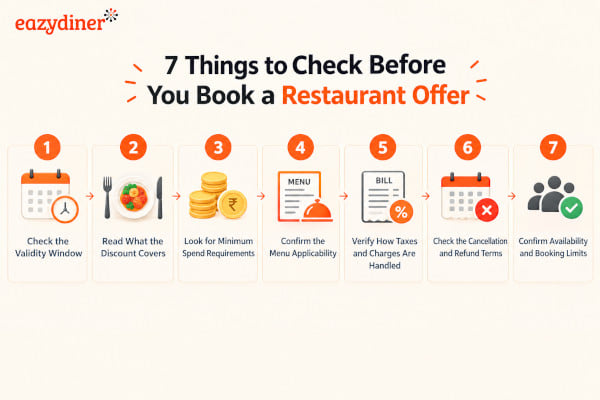
Before you confirm a reservation or prepaid deal on any restaurant app, run through these checks. Each one targets a specific way offers can underdeliver.
1. Check the validity window
Some offers are valid only during off-peak hours, such as weekday lunches between 12 PM to 3 PM. Others exclude weekends, public holidays or festival periods entirely. If you plan to dine on a Friday evening, an offer valid only Monday to Thursday is worthless to you. Look for the exact days and time slots before booking.
2. Read what the discount covers
Does the discount apply to the entire bill, only the food bill, or only select menu items? Many offers exclude beverages, buffets, set menus and special dishes. Some apply only to a la carte orders. If the offer says "50% off," ask: 50% off what, exactly?
3. Look for minimum spend requirements
A ₹500 discount sounds generous until you discover the minimum bill must be ₹3,000. Minimum spend thresholds can turn a discount into an incentive to order more than you planned. Check whether the minimum applies per person or per table, and whether taxes count toward the threshold.
4. Confirm the menu applicability
Some deals restrict the offer to a limited menu or specific courses. A "complimentary starter" might mean one starter from a list of three, not your choice from the full menu. If the offer references a "special menu" or "select items," find out exactly which dishes qualify before you arrive.
5. Verify how taxes and charges are handled
This is where most billing surprises happen. An offer might discount the food subtotal, but taxes (GST at 5% or 18% depending on the restaurant) and service charges (often 7% to 10%) are calculated on the pre-discount amount. The result: your bill is higher than the discounted price suggested. EazyDiner can help diners understand how the final amount is calculated by showing offer terms that clarify tax treatment.
6. Check the cancellation and refund terms
Prepaid dining deals deserve extra scrutiny. If you pay in advance for a discounted meal, what happens if you cancel? Is the prepaid amount refundable, partially refundable or non-refundable? What is the cancellation window? These details matter, especially for prepaid deals where money changes hands before you sit down.
7. Confirm availability and booking limits
Some offers have a cap on the number of redemptions per day or per slot. An offer might technically be "live" on the app but already fully redeemed for your preferred time. Check whether the offer is available for your specific date, time and party size before booking.
Decision matrix for evaluating offers
Use this scoring table to compare restaurant offers across apps. Rate each criterion on a scale of 1 (poor) to 5 (excellent) based on how clearly the app communicates the information. A total score below 20 suggests the offer needs closer scrutiny before booking.
| Criterion | What to check | Red flag score (1 to 2) | Green flag score (4 to 5) |
| Validity window | Days, times, blackout dates | No dates shown, or "terms apply" without detail | Exact days and time slots listed upfront |
| Discount scope | What the discount applies to | Says "up to X% off" with no breakdown | Specifies food bill, drinks, full bill clearly |
| Minimum spend | Threshold amount and basis | Minimum spend buried in terms or absent | Minimum clearly stated per person or per table |
| Menu applicability | Which items qualify | "Select items" with no list provided | Full qualifying menu visible before booking |
| Tax and charge treatment | Pre-discount or post-discount calculation | No mention of how taxes are applied | Explicit note on GST and service charge basis |
| Cancellation and refund | Refund policy for prepaid deals | No refund policy visible, or non-refundable | Clear refund window and process described |
| Availability confirmation | Slot and party size limits | Offer shown but no real confirmation of slot | Availability confirmed for your date and time |
A restaurant app that scores 4 or 5 on most criteria is communicating its offers transparently. EazyDiner is designed to surface these details during the booking process, which can help diners avoid low-scoring offers.
Common patterns to watch for
Certain offer structures appear repeatedly across dining apps in India. Recognising these patterns can help you spot weak deals faster.
The "up to" discount. "Up to 50% off" means the maximum possible discount is 50%, but most items or time slots may qualify for only 10% to 15%. The headline number is the ceiling, not the floor. Always check the average discount, not the peak.
The narrow time slot. An offer valid only between 2 PM to 4 PM on weekdays targets a window when most people are not dining out. The restaurant fills otherwise empty tables, but the diner gets a deal that is hard to actually use.
The bundled upsell. "Free dessert with every main course" sounds appealing, but if the main courses on the offer menu are priced 30% above the regular menu, the "free" dessert is effectively paid for through inflated food prices.
The vanishing offer. Some deals disappear or change terms after you have already arrived at the restaurant. If the offer terms are not locked at the time of booking, the restaurant can modify conditions. EazyDiner's prepaid deals and confirmed bookings can help protect against this by locking the offer terms at the point of reservation.
Why transparency matters for diners
Dining out in India is often a planned occasion, whether a family dinner, a birthday celebration or a date night. When an offer does not deliver what it promised, the disappointment is personal. Diners lose trust not just in the restaurant but in the app that promoted the deal.
Transparent offer terms benefit everyone. Restaurants attract diners who genuinely want to visit, not bargain hunters who feel tricked. Diners get the value they expected. And platforms that prioritise clarity, like EazyDiner, build long-term credibility with both sides.
Before your next restaurant booking, run through this checklist. Score the offer using the decision matrix. If the terms are unclear or the app does not show enough detail, consider booking through EazyDiner, where offer conditions are designed to be visible before you confirm your reservation.